The article says “click Settings”. Settings moved two releases ago.
Record the task once, the way a customer would do it. TurtleScene writes the step-by-step article with a screenshot for every step, voices a narrated video of the same steps, and builds a clickable version you can embed in the article.
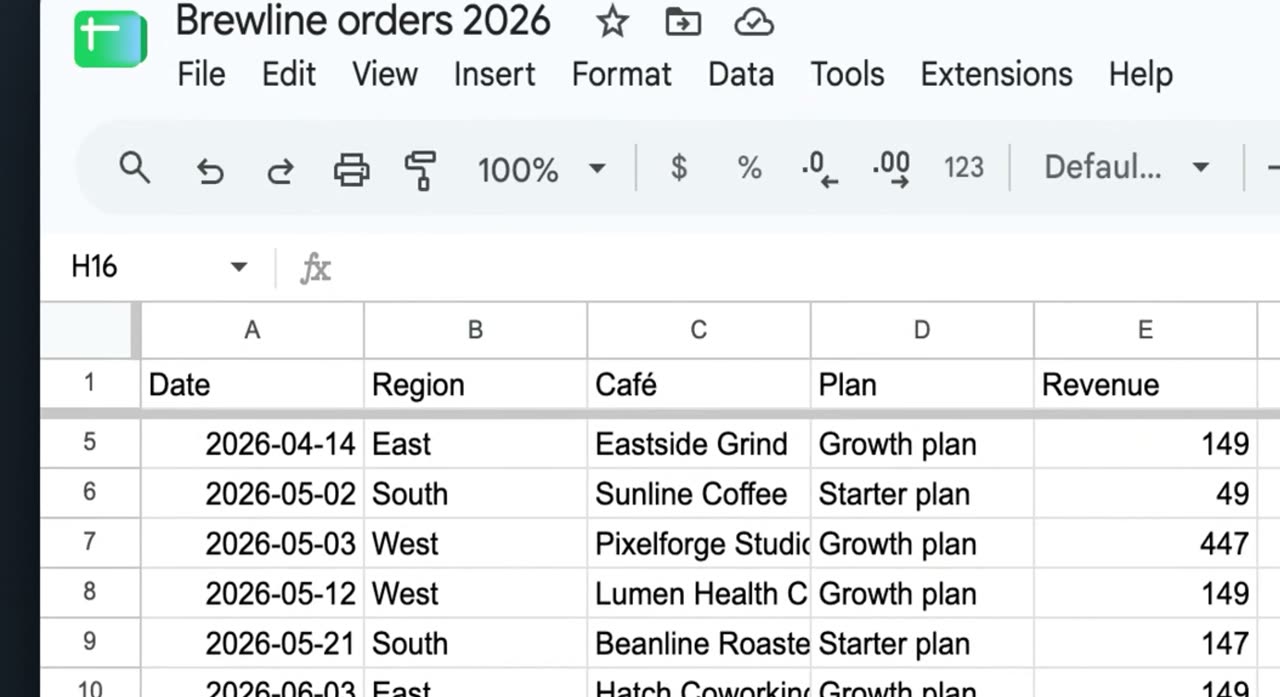
Click the top-left corner cell area of the sheet to highlight the entire dataset. Make sure all rows and columns in your table are selected before you continue.
The help article TurtleScene wrote from a real recording of Google Sheets (building a sales dashboard): 10 steps, 10 screenshots.
All 19 files from this Google Sheets recordingText, screenshots and video: three jobs that drift apart.
A good help article has numbered steps, a screenshot of each one and, ideally, a short video. They're made separately and by hand, so when the UI changes the text gets fixed, the screenshots sometimes, and the video almost never. Readers notice the mismatch before you do.
Accurate on the day. Every screenshot is captured, cropped and uploaded one at a time, and there's no video, so readers who learn by watching open a ticket instead.
It covers the readers who'd rather watch, but it's silent or rambling, has no captions and doesn't match the written steps under it. It's also the first part of the page to go stale.
The article, the video and the clickable version come from the same steps and the same script, so they describe the same clicks in the same order.
- A help article in Markdown and HTML, with a screenshot per step
- A narrated video, with captions as SRT and VTT
- A clickable version readers step through inside the article
- A GIF of the key moment for the top of the page
Blur an area of the recording once and it is destroyed in the video, the article's screenshots and the clickable version. Recording in a demo account is still the safest start.
Everything one help article needs
The files from one Google Sheets recording that a help centre would use. Open any of them.
From one recording to shipped
- 01Record the task as a customer would
Start where the customer starts, make one deliberate click per step and pause a second on each screen. The frame before each click becomes that step's screenshot in the clickable version.
- 02Fix the steps and script first
The article is written from your step titles and narration, so correct them in the editor and render. The article's screenshots are taken from the rendered video.
- 03Generate the article
In the Formats tab, tick Help article and click Generate. You get article.md for help centres and docs sites, and article.html styled in your brand colour.
- 04Assemble the page
Copy the Markdown into your help centre and edit it there, add the video, and embed the clickable version with the snippet from its Share window.
Built for this job
An article written from what you did
A “How to” title, a short introduction, one numbered section per step with an imperative heading, a screenshot and one to three sentences, then a closing line. It only describes what's in your steps and narration.
- article.md and article.html, and Copy Markdown in one click
- Step order comes from the recording, not the AI
- Written in the second person and plain language
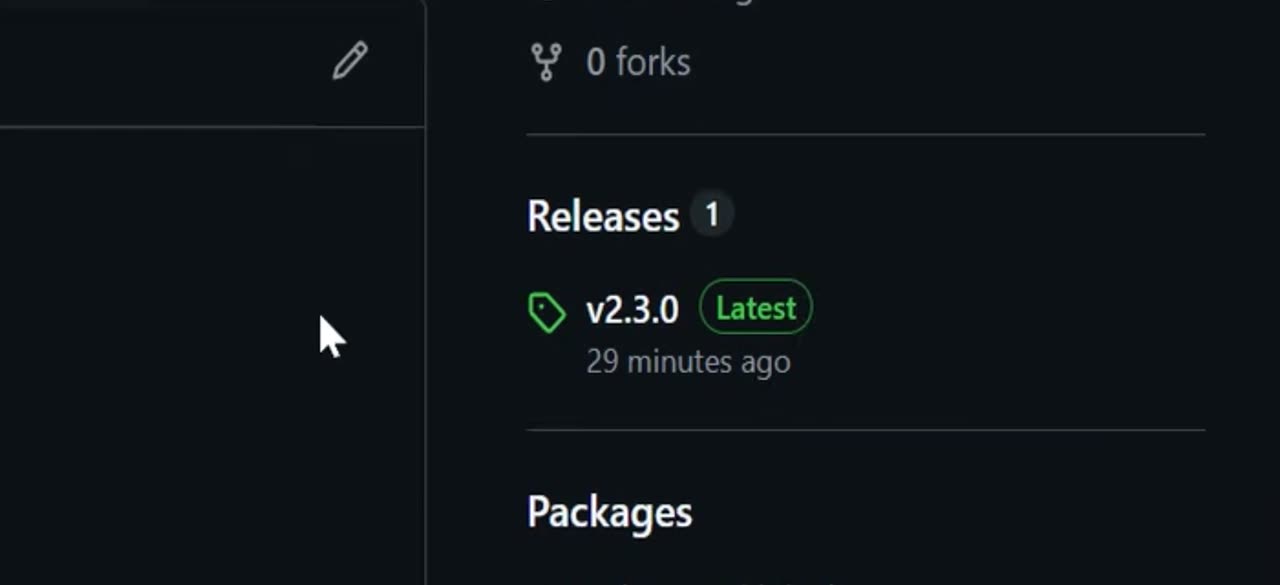
From the repository homepage, click the latest release tag, shown as v2.3.0 Latest. This opens the releases page, where you can see the current release details.
article.md, from a real recording of GitHub made with TurtleScene: “Publish a release with generated notes on GitHub”.
A video for readers who'd rather watch
The narrated video walks through the same steps with a spotlight on each click and an AI voice reading the script. Send its share link, or download the MP4 and captions for your own player or YouTube.
- Captions as SRT and VTT
- A pronunciation dictionary so product names are said right (Starter plan and up)
- Downloads up to 1080p on paid plans, 720p on Free
demo.mp4, from a real recording of Google Sheets made with TurtleScene: “Build a sales dashboard in Google Sheets”.
A clickable version inside the article
Embed the clickable demo with a fixed-height iframe or a responsive 16:9 wrapper. Readers try the task on the page, and a deep link can open it on the step the paragraph describes.
- Blur destroys names or figures in the published screenshots
- Arrow keys move between steps
- A password for internal or customer-only guides (Starter plan and up)
The clickable demo, from a real recording of Google Sheets made with TurtleScene: “Build a sales dashboard in Google Sheets”.
Captions for every video in the article
Readers who can't play sound get the same words. The caption files are timed to the narration and split at natural phrase breaks, ready for your player or YouTube.
- 00:00Here's how to build
- 00:01a sales dashboard in Google Sheets.
- 00:04Select the top-left corner
- 00:06so the full dataset is highlighted.
- 00:10With the table selected, open the Insert
- 00:12menu to add something based on this data,
- 00:15and choose Insert from the top toolbar.
demo-captions.srt from the Google Sheets recording, as generated.
All 19 files from this Google Sheets recordingHelp-centre videos: questions
Something else? Email contact@turtletechsai.com or book a working session.
Does it publish straight to our help centre?
No. There are no help-centre connectors. Copy the Markdown or download the files and paste them into your help centre, where you edit and publish them like any other article.
Where are the article's screenshots hosted?
At public addresses in our storage, so the Markdown shows them wherever you paste it. Anyone with an image's address can open it. If you'd rather host them yourself, swap the addresses after pasting.
Can we edit the article in TurtleScene?
No. It's a draft to finish in your help centre. To change what the AI writes from, edit the steps and script, re-render and generate the article again.
How do we keep customer data out of screenshots?
Record in a demo account with made-up data. If a name or figure still shows, blur it in the editor: the area is destroyed in the video, the article's screenshots and the clickable version.
Are help articles translated?
The narrated video and the clickable version can be translated into 14 languages (Starter plan and up, one credit per language). The help article isn't part of a translation.
How many articles can we make a month?
One per recording: 2 a month on Free, 10 on Starter, 40 on Studio and 120 on Team. The article, video, clickable version and other formats from a recording don't use any more.
Related
- Use caseCustomer onboardingClickable walkthroughs and short narrated videos for the first week, rebuilt when the UI moves.Read
- Use caseLocalisationThe same demo in 14 languages: narration, captions, step cards and tooltips (Starter).Read
- Use caseRelease notes and changelog videosEvery changelog entry gets a 30-second highlight and a GIF people actually open.Read
- TeamSupport and docsHelp articles that come with a video and a clickable demo, from the recording you'd make anyway.Read
Independent tutorials we recorded ourselves. Google Sheets and GitHub are trademarks of their owners; TurtleScene is not affiliated with or endorsed by them.
Your next release ships soon. Ship the explanation with it.
Start free and record your first flow in the browser, or book a working session and we'll build a kit from one of your flows with you.