The changelog lists what changed. Nobody can picture it.
Record the changed flow once, usually in a minute or two. The entry gets a 30-second highlight with captions, a GIF that plays wherever an image does, a thumbnail for the link, and the full narrated walkthrough for anyone who clicks through.
The highlight TurtleScene cut from a real recording of GitHub: publishing a release with generated notes. Captions are burned in.
All 19 files from this GitHub recordingRelease notes are written for people who already know the screen.
A changelog entry names the setting, the button and the page it lives on. Customers who haven't opened that page skim past, and the change they asked for goes unnoticed. A picture would help, but making one for every entry, every sprint, is nobody's job.
Quick, and it shows where the change is rather than what it does. Two redesigns later the screenshot is wrong, and nobody remembers which entries used it.
The headline feature gets a video weeks after release. The fixes and small improvements, which are most of the changelog, get nothing.
Walk through the changed flow once. The entry gets a clip short enough to watch in the changelog, and the longer version sits behind the link.
- A highlight of about 30 seconds, captioned, in landscape and 9:16
- A silent GIF of up to 12 seconds for changelogs, emails and READMEs
- A 1280×720 thumbnail for the link preview
- The full narrated video and a clickable demo for the detail
The formats are included with the video. Generating them, or generating them again, doesn't use a credit.
What a changelog entry can carry
The short-form files from one GitHub recording, and the full narrated video they were cut from. Open any of them.
From one recording to shipped
- 01Record only what changed
Start on the screen just before the change and stop once the result shows. One entry rarely needs more than a minute or two, well inside the 3-minute limit on the Free plan.
- 02Check the steps and the script
TurtleScene finds each click and writes a line of narration for it. Reword any line so it matches the wording in your release note, then render.
- 03Generate the short formats
In the Formats tab, keep Highlight, Highlight 9:16, GIF preview and Thumbnail ticked and click Generate. You can leave the page while they're made.
- 04Paste them into the entry
Put the GIF or the highlight in the changelog entry, use the thumbnail for the link preview, and link the narrated video or clickable demo for anyone who wants the whole flow.
Built for this job
A highlight with a setup and a payoff
It isn't the first 30 seconds of the video. It keeps the opening line and the closing one, then adds the lines where something appears or finishes, and each moment runs until its click has visibly done something. Word-group captions are burned in, so it reads with the sound off.
- Landscape for the changelog and email, 9:16 for Stories
- Cut from the narration, with no timeline to edit
demo-highlight-vertical.mp4, from a real recording of GitHub made with TurtleScene: “Publish a release with generated notes on GitHub”.
The full walkthrough behind the link
Some readers want the whole flow. The same recording makes the narrated video, framed in the Studio style with a spotlight on each click, and a clickable demo they can step through. The video's share link always plays the latest render.
- The clickable demo is built from the same steps without using a credit
- Captions as SRT and VTT
demo.mp4, from a real recording of Linear made with TurtleScene: “Plan a release in Linear”.
Fix the wording, not the edit
If a label changes after the release, edit that line of the script and re-render; lines you didn't touch keep their audio. The Formats tab then says the pack is out of date, and Generate makes the short formats again from the new render.
- 00:00Here's how to plan a release in Linear.
- 00:04From the Projects page, open the project
- 00:06creation modal with New project.
- 00:10In the new project form
- 00:12for v2.4: Usage dashboard,
- 00:14assign an owner for this release
- 00:16by opening the Lead field.
demo-captions.srt, from a real recording of Linear made with TurtleScene: “Plan a release in Linear”.
The same highlight, as a GIF
The loop at the top of a changelog entry: up to 12 seconds cut from the highlight, 720 pixels wide and silent, so it plays in a changelog, an email or a README without a video player.
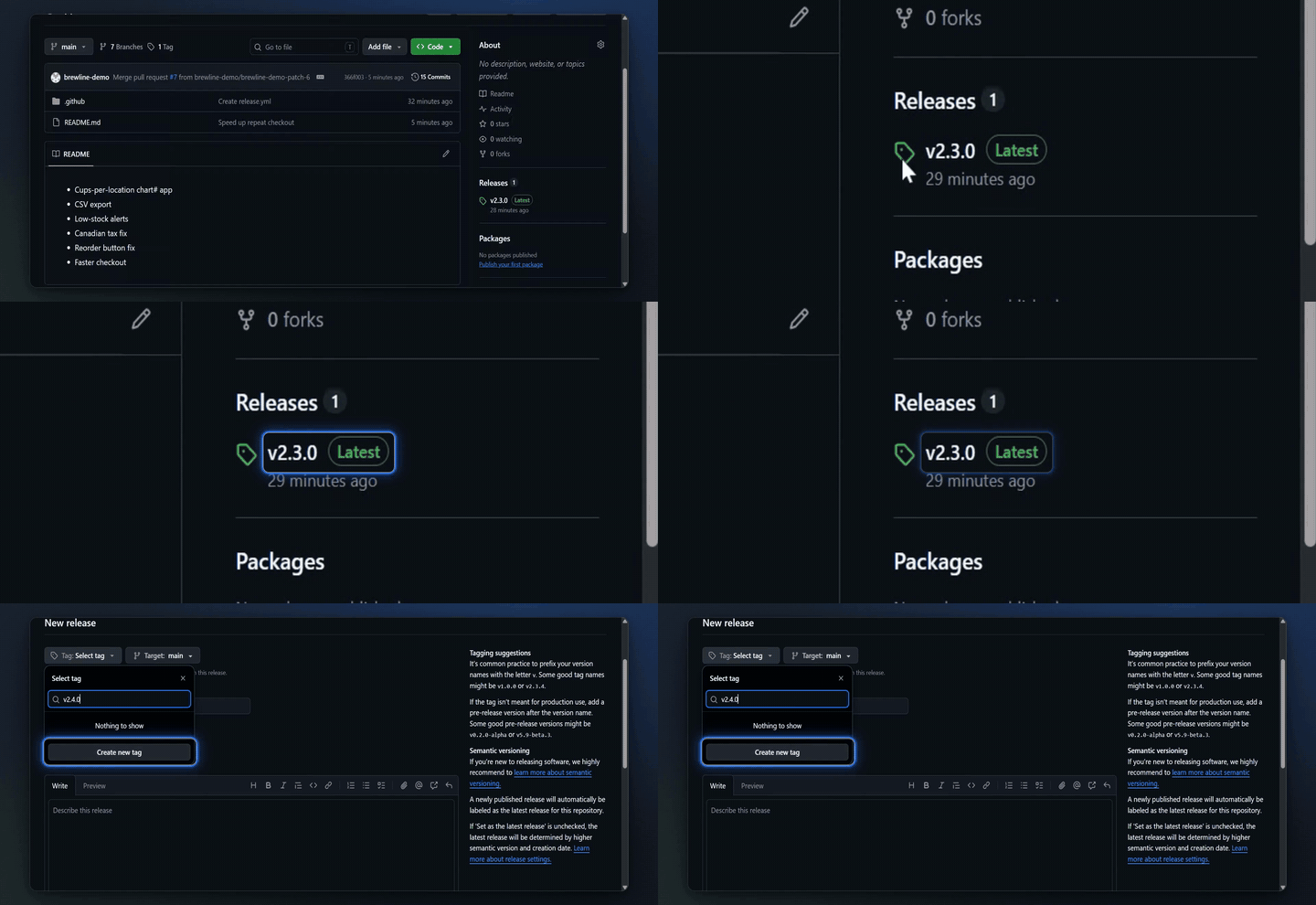
demo-preview.gif from the GitHub recording, as generated.
All 19 files from this GitHub recordingRelease notes and changelog videos: questions
Something else? Email contact@turtletechsai.com or book a working session.
How long should a changelog recording be?
As long as the change takes to show, usually under two minutes. The highlight aims for about 30 seconds whatever the length. Each plan caps a single recording: 3 minutes on Free, 5 on Starter, 10 on Studio and 20 on Team.
Does every changelog entry use a credit?
Each new recording uses one AI recording from your monthly allowance, and that covers its narrated video, clickable demo and every format. Starter has 10 a month, Studio 40 and Team 120. Small changes in the same flow can share one recording.
Can the GIF go in an email?
Yes. It's an ordinary silent GIF, so it shows in most email clients and anywhere else an image does. Use the highlight MP4 where video plays, such as a landing page or a changelog tool that accepts video.
Does TurtleScene publish to our changelog?
No. You download the files from the Formats tab and add them to your changelog, email tool or docs yourself. Download links last an hour; reopen the tab for fresh ones.
What if we reword the entry after it ships?
Edit the script line and re-render, and the share link plays the new version. Then generate the formats again. Each generation replaces the previous pack, so download anything you want to keep first.
Can the narration be in our own words?
Yes. Edit any line the AI wrote, or tick Record my microphone, talk through the change while recording, and turn what you said into the script. The AI voice reads it; your own voice is never in the video.
Related
- Use caseFeature launchesShip the launch video, clickable demo, cuts and posts the day the feature goes live.Read
- Use caseSocial launch clips9:16 and 1:1 cuts that follow each click, with captions burned in, from the same take.Read
- Use caseHelp-centre videosEach help article with a narrated video, a clickable version and step screenshots from one recording.Read
- TeamProductShow what shipped at sprint review and in the changelog without making a video.Read
- TeamProduct marketingLaunch every release with the full kit, not just a blog post and a screenshot.Read
Independent tutorials we recorded ourselves. GitHub and Linear are trademarks of their owners; TurtleScene is not affiliated with or endorsed by them.
Your next release ships soon. Ship the explanation with it.
Start free and record your first flow in the browser, or book a working session and we'll build a kit from one of your flows with you.