“Book a demo” is the only way to see the product. Most visitors won't.
Put a clickable demo of the real product on your homepage or pricing page, made from one recording, with the narrated video beside it for people who'd rather watch. Serve it from your own subdomain and ask for an email before it starts on the Studio plan and up.
The clickable demo from a real recording of a Stripe sandbox (creating a payment link), embedded as it would sit on your site. Click to load it.
All 19 files from this Stripe recordingYour website describes the product. It doesn't show it.
Visitors read three screens of benefits and still can't picture using it. The only way in is a sales call, which suits some buyers and loses the ones who wanted to look around first.
The visitor watches someone else use the product. The screenshots are cropped marketing art, and both date the moment the UI changes.
The real thing, behind a sign-up, often empty of data, and a sandbox is an engineering job to keep working. Many visitors never reach the part that matters.
A click-through of your real product, made from one recording, with your data, your wording and your colours, in an iframe on your page.
- A fixed-height iframe or a responsive 16:9 wrapper
- Autoplay, loop, a dark theme or hidden controls from the embed address
- A lead form before or after it (Studio plan and up)
- The narrated video and a 30-second highlight beside it
The demo is screens from your recording, not a live copy of your product. Visitors follow the steps you recorded.
What goes on the page
The files from one Stripe recording that a product page can use. Open any of them.
From one recording to shipped
- 01Record the flow that sells
Pick the one task that shows the product's value in a minute or two, and walk through it in a demo account with realistic data.
- 02Rewrite it for strangers
Edit the tooltips for someone who has never seen the product, add an intro chapter, and set an end call to action with your sign-up link. Blur anything private.
- 03Embed and brand it
Copy the iframe or the responsive snippet from the Share window. Add your logo and a button to the share page, and hide the TurtleScene badge (Starter plan and up).
- 04Find the step where visitors leave
Analytics (Starter plan and up) shows completion rate and CTA clicks for each demo. Shorten the demo or rewrite the tooltip where people stop.
Built for this job
An embed that fits the page, on your domain
Two snippets: an iframe 600 pixels high, or a wrapper that keeps 16:9 at any width. Options on the embed address set autoplay, loop, the starting step, a dark theme, hidden controls and whether the end screen shows.
- Your own subdomain, such as demos.yourcompany.com (Studio plan and up)
- A lead form that gates the demo or follows it, delivered to HubSpot, Slack or a webhook (Studio plan and up)
- Meta title, description, preview image and noindex for the share page
The clickable demo, from a real recording of Stripe made with TurtleScene: “Create a payment link in Stripe”.
The narrated version beside it
Some visitors won't click. The same recording gives you the narrated video in the Studio style, on your brand colours with a spotlight on each step. Download the MP4 and its captions for your own player, or link its player page.
demo.mp4, from a real recording of Stripe made with TurtleScene: “Create a payment link in Stripe”.
A muted loop above the fold
The 30-second highlight has captions burned in, so it plays muted on a loop and still makes sense. Where video isn't allowed, the GIF cut from it does the same job.
demo-highlight.mp4, from a real recording of Stripe made with TurtleScene: “Create a payment link in Stripe”.
The why, as an animated story
The same take retold as a story video of a minute or so, with every scene's animation in the file. It has its own embed snippet, so it can sit on the page next to the demo.
story.mp4, from a real recording of Stripe made with TurtleScene: “Create a payment link in Stripe”.
One pass through the product, no script
Everything on this page came from one take of about a minute in a Stripe sandbox, with its pauses and no voice: the clickable demo, the narrated video, the highlight and the story. This GIF was cut from the same take, for the places a video can't play.
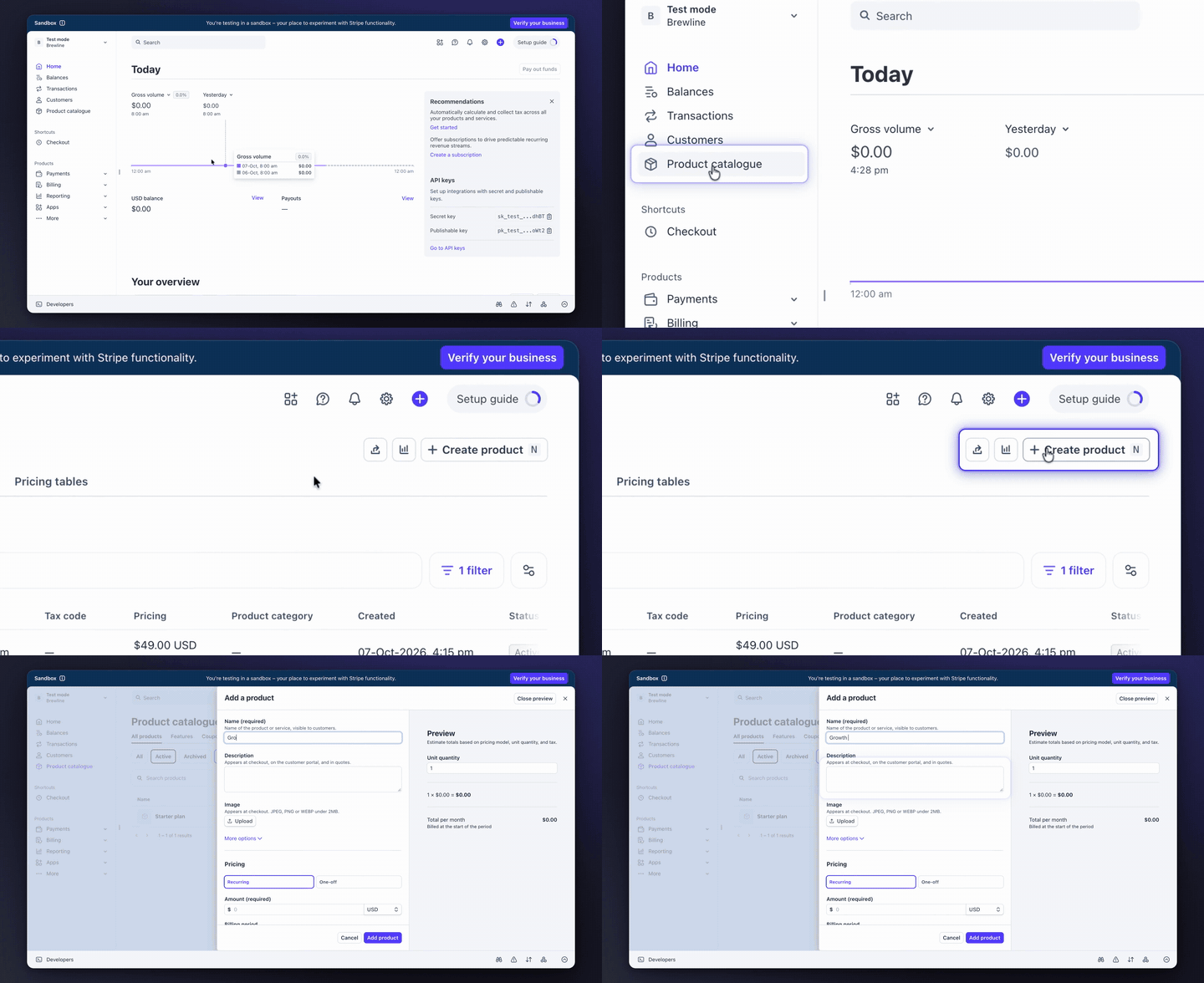
demo-preview.gif from the Stripe recording, as generated.
All 19 files from this Stripe recordingWebsite interactive demo: questions
Something else? Email contact@turtletechsai.com or book a working session.
Is the demo a live copy of our product?
No. It's the screens from your recording, one per click, with the clicked element outlined and a tooltip. Visitors can't wander off the path, and nothing connects to your real systems.
Can we serve it from our own domain?
Yes, on Studio and up. Choose a subdomain such as demos.yourcompany.com, add a CNAME and a TXT record, check them in the Integrations tab, and ask us to switch on HTTPS, which we do within one business day.
Can we ask for an email before the demo?
Yes, with a lead form set to Before demo (Studio plan and up). Every field you add is required, so ask only for what you need. After demo lets more visitors see the whole thing first.
Does the demo show a TurtleScene badge?
On Free, shared demos show a small Made with TurtleScene badge. On Starter and up you can hide it or replace it with your own text and link.
How do we keep it current?
When the flow changes, re-record it and build the demo again; the rebuilt demo has its own link, so update the embed. When only one screen changed, replace that step's screenshot in the editor and the embed stays as it is.
Does a demo from screenshots count against our allowance?
No. Clickable demos made from uploaded screenshots are unlimited on every plan. A demo built from a recording is included with that recording's credit.
Related
- Use caseSales demos and follow-upsA clickable demo prospects try after the call, with a lead form that lands in HubSpot (Studio).Read
- Use caseFeature launchesShip the launch video, clickable demo, cuts and posts the day the feature goes live.Read
- Use caseLocalisationThe same demo in 14 languages: narration, captions, step cards and tooltips (Starter).Read
- TeamProduct marketingLaunch every release with the full kit, not just a blog post and a screenshot.Read
- CompareTurtleScene vs ArcadeArcade makes interactive demos and AI videos. TurtleScene makes the narrated video, clickable demo, cuts, article and translations from one recording.Read
Independent tutorials we recorded ourselves. Stripe is a trademark of their owners; TurtleScene is not affiliated with or endorsed by them.
Your next release ships soon. Ship the explanation with it.
Start free and record your first flow in the browser, or book a working session and we'll build a kit from one of your flows with you.