The article says "click Settings". The screenshot shows last year's menu.
Record the flow you'd document anyway. TurtleScene writes the step-by-step article with a screenshot for every step, and makes a narrated video and a clickable version from the same take, so each answer comes in the form the reader prefers.
Clickable demo built from a real recording of Linear (planning a release). Click to load it and try it.
All 19 files from this Linear recordingDocs go stale one screenshot at a time. Nobody has time to retake them.
Every release breaks a few screenshots and makes a few articles wrong. Readers who can't follow the words open a ticket, and an agent types out the same steps again.
Capture, crop, annotate and paste every step, then do it again when the UI changes. The retakes never get prioritised, so articles drift.
A raw screen recording answers one customer once. It has no captions, no steps to skim and no written version to search, and nobody sees it again.
Record the flow once. TurtleScene writes the article from the steps and narration, takes a screenshot for each step from the rendered video, and gives you the video and a clickable version to put beside it.
- Help article in Markdown and as a styled HTML page
- Narrated video with captions (SRT and VTT)
- Clickable demo to embed in the article
- A GIF for ticket replies and release notes
The article is a draft in Markdown. You edit it in your help centre, where it lives.
Every release, every job
- 01Help-centre articlesStep-by-step articles with a screenshot for every step, written from the recording.How it works
- 02Getting-started guidesThe first-week tasks as clickable tours and short videos, linked from onboarding emails.How it works
- 03Ticket repliesA GIF or a video link to paste into a reply, instead of typing the steps out again.
- 04Release notesA 30-second highlight and a GIF for each change that affects how customers work.How it works
- 05Localised helpVideos and clickable demos in 14 languages for customers in other markets (Starter plan and up).How it works
Your help-centre kit, from one take
The real files from one recording of Linear, including the ones a help centre uses most.
From one recording to shipped
- 01Record the flow you'd document
When a change ships, walk through the task once in your browser, in a demo account, or upload a recording you already have. No script needed.
- 02Check the steps, then render
Fix any step title or narration line as text and render the video. The article is written from these steps, so this is where you get it right.
- 03Generate the article and publish
Tick Help article in the Formats tab, copy the Markdown into your help centre, embed the clickable demo under it and link the video. Reply to tickets with the GIF.
Built for this job
An article with a screenshot for every step
The help article follows the narrated video: a "How to…" title, a short introduction, then one numbered section per step with a screenshot of that moment and one to three sentences of instructions. It only describes what's in your steps and narration.
- article.md for help centres, docs sites and READMEs
- article.html, a styled page with your brand colour
- Included with the recording; it doesn't use another
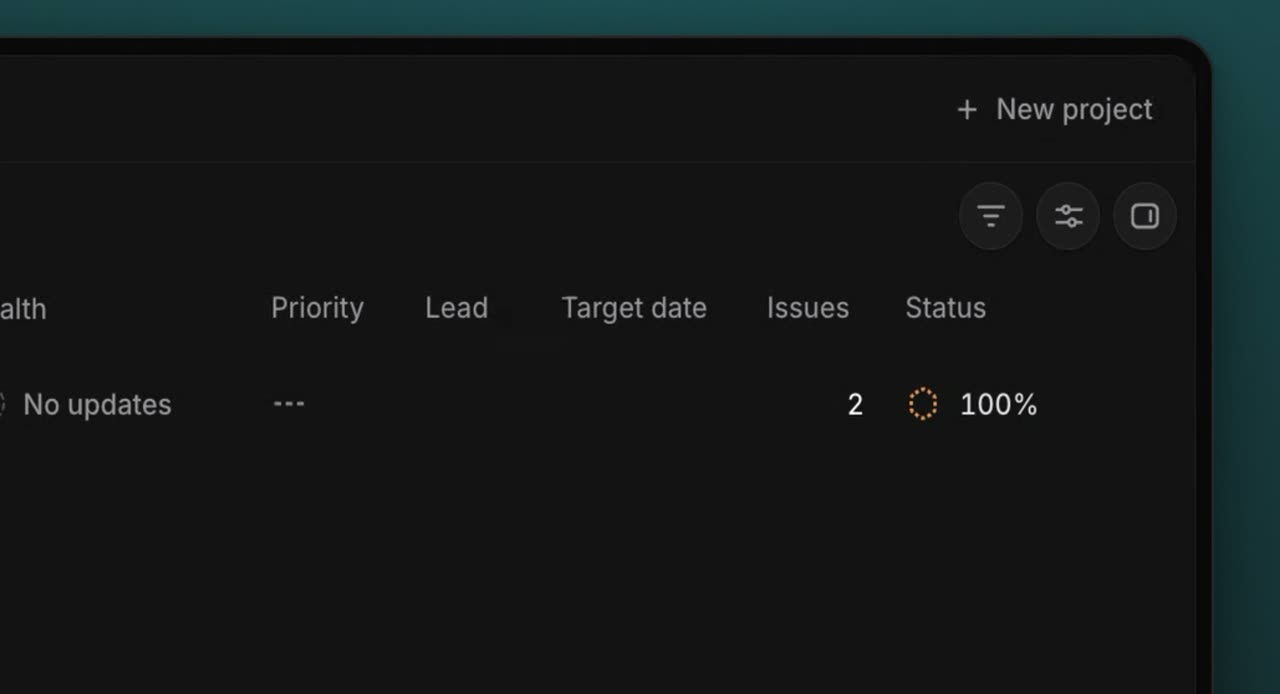
From the Projects page, click New project in the top right corner. This opens the project creation modal.
article.md, from a real recording of Linear made with TurtleScene: “Plan a release in Linear”.
A video for readers who'd rather watch
The narrated video frames each step in the Studio style, with a deep zoom and a spotlight on the element to click, and cuts the long waits. Anyone with the link can watch it without signing in, and it always plays the latest render.
- Captions as SRT and VTT for your player
- Cut loading screens and add intro and end cards
- Downloads as MP4 for your own video host
demo.mp4, from a real recording of Linear made with TurtleScene: “Plan a release in Linear”.
A GIF for the ticket reply
Each narrated video comes with a silent GIF loop and a 30-second highlight from the Formats tab. Paste the GIF into a reply or a macro so the customer sees the click, not a paragraph describing it.
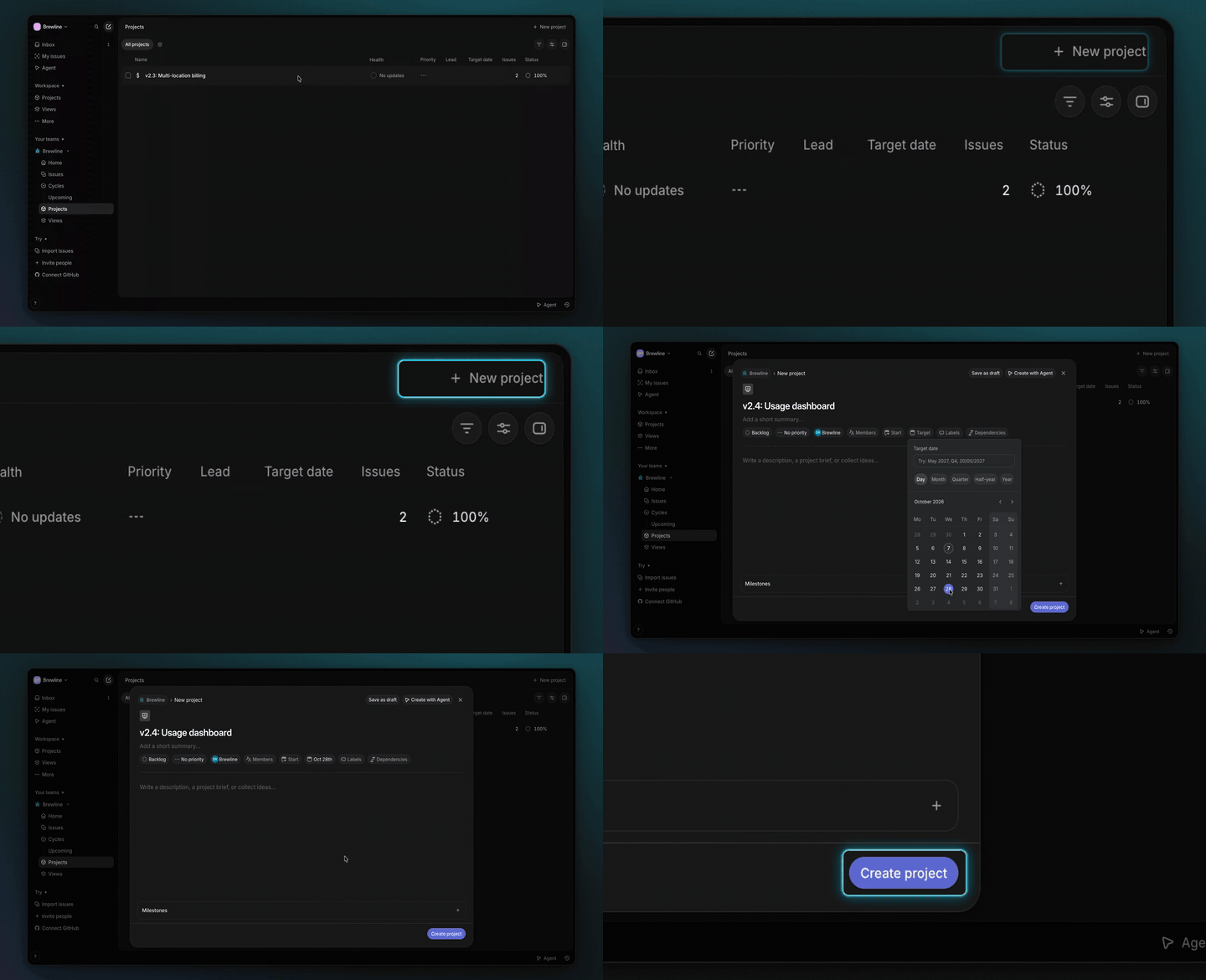
demo-preview.gif, from a real recording of Linear made with TurtleScene: “Plan a release in Linear”.
Help in 14 languages
Translated versions of the video (narration, step cards and captions) and of the clickable demo (tooltips, step titles and chapter names). The article is written from the original script and isn't translated. Each language uses one recording from your allowance.
Narration, captions and step cards in the video; tooltips, buttons and the lead form in the clickable demo. The recorded screens themselves stay as recorded.
One library for support and docs
Every recording stays in the workspace, and any member can make another output from it or pick up someone else's draft. Studio has 3 creator seats and Team 10, with admin roles on Team.
- See what was made from each recording
- Brand colours and logo set once for the workspace
raw-recording.mp4: 30 seconds of a recording of turtlecanvas, one of our own products, as it went in.
Captions from the script, timed to the voice
Every narrated video comes with caption files in SRT and VTT, split at natural phrase breaks. These are the first lines of the Linear walkthrough, as TurtleScene wrote them.
- 00:00Here's how to plan a release in Linear.
- 00:04From the Projects page, open the project
- 00:06creation modal with New project.
- 00:10In the new project form
- 00:12for v2.4: Usage dashboard,
- 00:14assign an owner for this release
- 00:16by opening the Lead field.
demo-captions.srt from the same Linear recording, unedited.
All 19 files from this Linear recordingSupport and docs: questions
Something else? Email contact@turtletechsai.com or book a working session.
What exactly is in the help article?
A "How to…" title, a one- or two-sentence introduction, one numbered section per narrated step with a screenshot and short instructions, and a one-line wrap-up. You get article.md and article.html. The screenshots are hosted at public addresses so the Markdown works wherever you paste it.
Can we embed the clickable demo in our help centre?
Yes, if your help centre accepts HTML embeds. Share gives you an iframe or a responsive 16:9 wrapper, and the address takes options such as the starting step, a dark theme, hidden controls or a language. Embedded views count in Analytics like any other.
What about customer data in the recording?
Record in a demo account where you can. If something private shows, blur it in the editor: that area is destroyed in the narrated video, its cuts, the clickable demo and any story made from the recording, so viewers can't see what was under it.
Do articles update themselves when the product changes?
No. Re-record the flow, render the new video and generate the article again; the Formats tab tells you when a pack is out of date. TurtleScene doesn't watch your product for changes.
Which languages can we publish in?
On Starter and up: Spanish, French, German, Portuguese, Italian, Dutch, Polish, Turkish, Indonesian, Hindi, Japanese, Korean, Chinese (Simplified) and Arabic. Videos and clickable demos are translated; the help article isn't.
How many of us can work in it?
Free and Starter have one creator seat. Studio has 3 and Team 10, with admin roles on Team. Every member can open and edit the workspace's recordings, videos and demos.
Related
- Use caseHelp-centre videosEach help article with a narrated video, a clickable version and step screenshots from one recording.Read
- Use caseCustomer onboardingClickable walkthroughs and short narrated videos for the first week, rebuilt when the UI moves.Read
- Use caseRelease notes and changelog videosEvery changelog entry gets a 30-second highlight and a GIF people actually open.Read
- Use caseLocalisationThe same demo in 14 languages: narration, captions, step cards and tooltips (Starter).Read
- TeamCustomer success and educationOnboarding and training content that keeps up with a product that ships every sprint.Read
- TeamProductShow what shipped at sprint review and in the changelog without making a video.Read
Independent tutorials we recorded ourselves. Linear is a trademark of their owners; TurtleScene is not affiliated with or endorsed by them.
Your next release ships soon. Ship the explanation with it.
Start free and record your first flow in the browser, or book a working session and we'll build a kit from one of your flows with you.